By Kevin Wilson
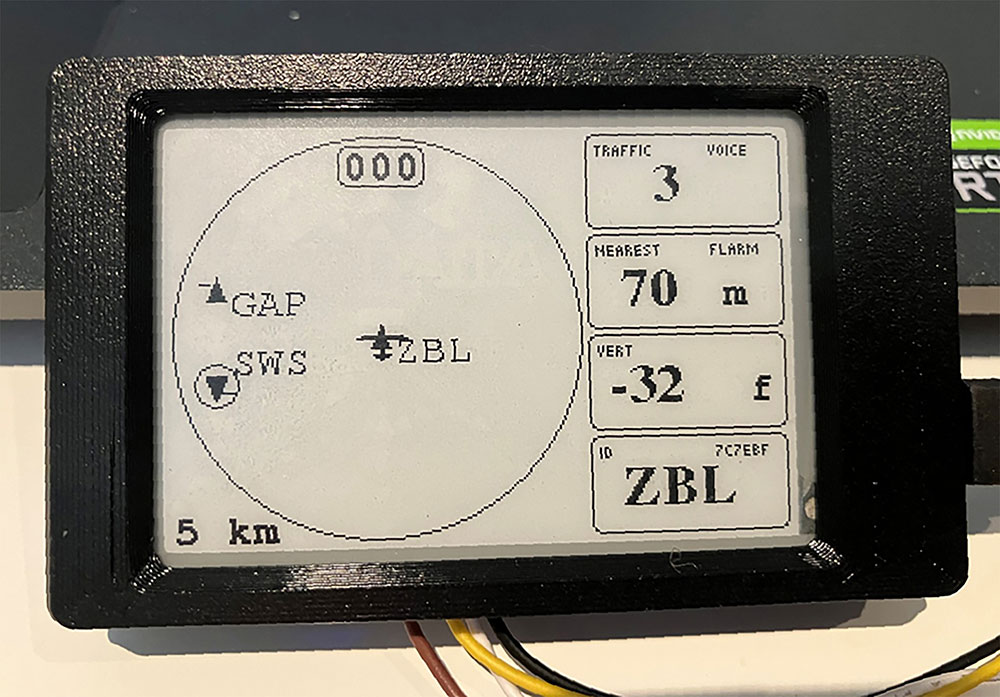
ABOVE: Radar View showing three aircraft in proximity. The host aircraft is a tug with ZBL on tow. SWS is another tug that has just released glider GAP
This is the story of how the low-cost DIY build ‘WAGA SkyView Display’ for FLARM & ADSB came to exist and the capabilities and features it provides. It’s in use in over 30 gliders in Western Australia and is also the first FLARM display to include unique features designed for tugs. This is not a commercial product and this is not an advert or product review. You can build you own for around $60! Since it’s based upon SoftRF open source software, an introduction to SoftRF and its FLARM compatible devices is provided. (See page 31.)
The WAGA SkyView display originated as a component of the Western Australia Gliding Association ‘WAGA Flarm project’ which Rob Hanbury, a WAGA member, conceived and initiated in mid-2024. The goal of the project was to reduce the risk of mid-air collisions in WA by equipping 100% of gliders and tugs with FLARM. While about 70% of gliders and tugs already had FLARM, he deduced that the high cost of commercial FLARM products was the most significant factor to overcome.
Initial research
Rob’s initial research suggested a trigger cost of circa $1,000 per installation, under which most remaining owners could be motivated to buy a FLARM system. This price point is not available from commercial manufacturers for a FLARM with display, even if a bulk order for members were coordinated. He therefore explored two options. The first was a batch of specially designed and built WAGA FLARMs with a genuine FLARM chipset, and second was a solution based on SoftRF software and hardware.
There was little use of SoftRF in Australia when Rob was considering the options, leading to a perceived risk regarding ongoing compatibility with other FLARMs. In any case, he found he was able to directly source genuine FLARM components and a promise of FLARM support, enabling the production of a special low-cost WAGA FLARM with ADS-B In, and so he chose that option. To keep the cost per installation under $1,000, he decided to offer the $60 SoftRF SkyView display with each WAGA FLARM transceiver.
How the WAGA FLARM transceiver development progressed is Rob’s story to tell, perhaps in a later GAus article, but the outcome is over 35 WAGA FLARMs successfully in service in WA. Because my project role was to enhance the SkyView display, I’m telling that part of the story here.
In January 2025, I was assisting Rob with the WAGA FLARM project in a small way. I had already experimented with a standard SoftRF SkyView display and dismissed it as inadequate, so I offered to take on the task of a ‘few small improvements’ he and I had in mind. Little did I suspect how much time and effort would be involved!
I should point out that I am not an experienced software programmer. I obtained my Electronic Engineering degree in 1981, which was practically the BC era – Before Computers! Back then we had main frames or machine coded processors and dot matrix printers. ‘Personal Computers’ (PCs) didn’t appear in quantity until around 1987 when I was working in the computing industry as a hardware service manager. I recall going to a launch presentation of the first version of the Microsoft Windows graphical user interface and coming away thinking that it would never become popular. I wish I had bought some shares!
Braner Fork
I am a glider and tug pilot who is experienced with Excel and Access VBA programming and, having recently retired, I was looking to learn C++ language computer coding as a hobby. Improving the SoftRF Skyview display code was just the right first C++ project I was looking for because it had purpose and connection with my flying interests.
Rob had got as far as installing the Arduino IDE (the C++ programming tool), downloading the SoftRF source file library from the public internet repository and tinkering with a few bits. He helped me to set up my PC and get going. We started with the Braner fork (version) of the SkyView display.
I dived in and started looking around the code library and reading about C++ on the internet. I worked out how the display’s core programme loops, the purpose of most of the files and then which files I needed to focus on for my changes. I was, and still am, in awe of Linar who created the software, Braner who improved it and the many others whose code libraries are called on for assistance when the program runs.
I quickly realised that to be able to test the display frequently during my coding changes, I would have to find a tool to efficiently send data to it exactly the way a FLARM sends (NMEA sentences) to a standard FLARM display. I started by using the little-known six basic simulations that are built into every PowerFlarm, but I yearned to be able to write my own simulations for specific testing purposes.
I tried using PC Terminal software (Putty and RealTerm) to send the data but that was impractical. So I turned to what I knew best, Microsoft Access, to create a simulation database that enables me to create and modify simulation files as data tables on a PC and then send them via a data port and data cable (using RS232 protocol) to the SkyView display. It’s a rough and ready tool but does the vital job.
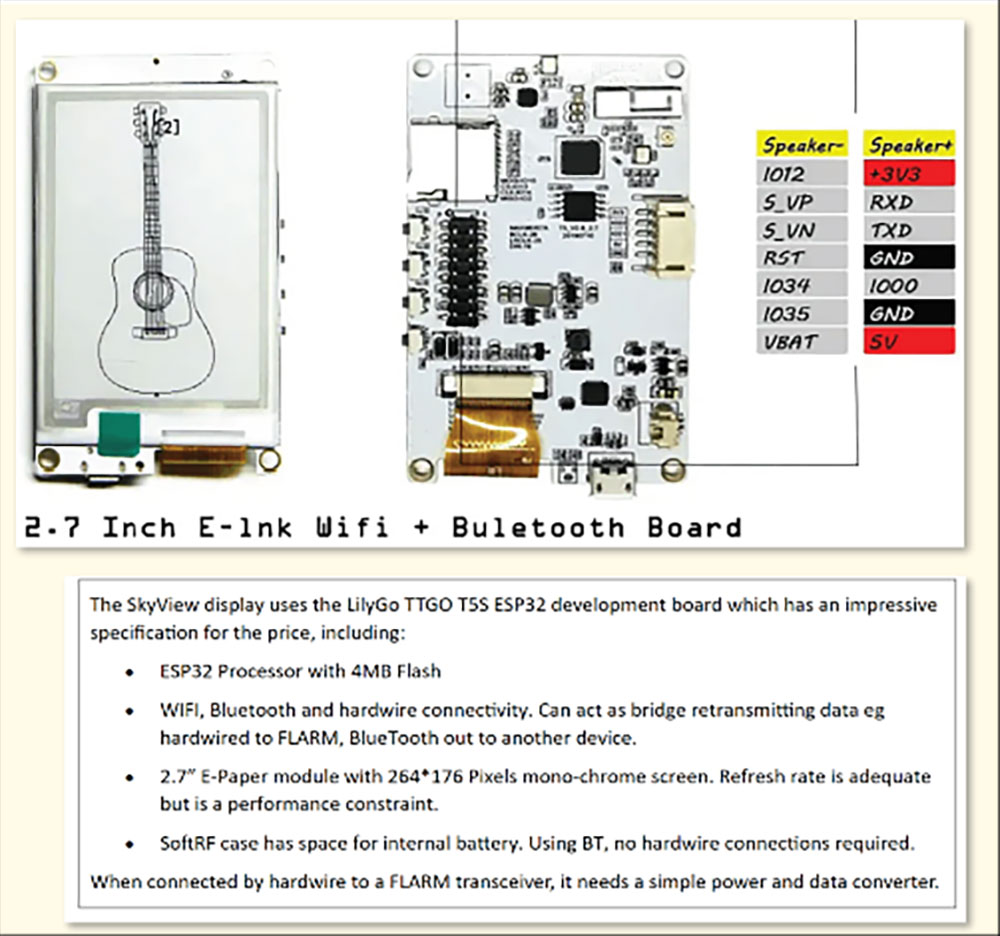
The SkyView display uses the LilyGo TTGO T5S ESP32 development board, which has impressive specifications for the price, including:
• ESP32 Processor with 4MB Flash
• WIFI, Bluetooth and hardwire connectivity. Can act as bridge retransmitting data eg hardwired to FLARM, BlueTooth out to another device.
• 2.7″ E-Paper module with 264*176 Pixels mono-chrome screen. Refresh rate is adequate but is a performance constraint.
• ThevSoftRF case has space for internal battery. Using BT, no hardwire connections required.
When connected by hardwire to a FLARM transceiver, it needs a simple power and data converter.
Not Rocket Science
The space in this article is insufficient to explain how the LilyGo board is set up or how to use the Arduino IDE for programming. But it’s not rocket science, and can be learned given determination and time. I made many programming mistakes during my learning experience – I found the trick is to make small programming steps, use the simulator to test after every step and have a route to step backwards if any step does not work.
I started by adding the option to change the display mode from portrait to landscape. That taught me how the radar screen and text boxes are made to display. More challenging was adding the display mode option to the code a mobile phone uses to make setting changes on the SkyView.
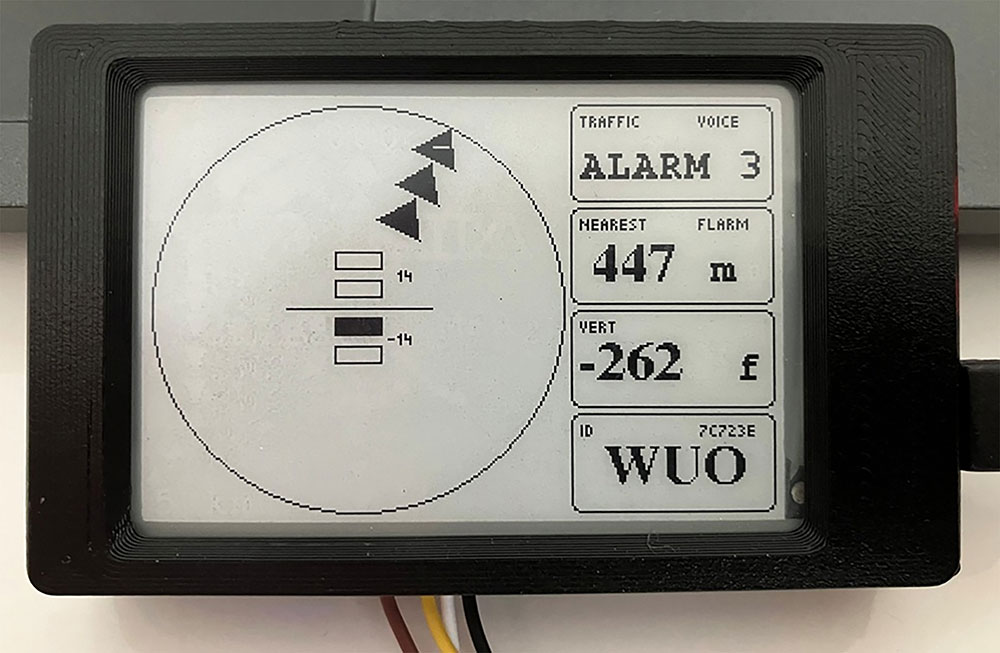
ABOVE: Alarm Panel showing a FLARM Level 3 alarm (0-9 seconds until collision). Lookout indicator (black triangles) shows relative direction. Centre bars show vertical angle. Threat has Comp ID ‘WUO’. Look out!
I continued making numerous coding amendments/additions to the Braner fork we started with. These are some of significant ones:
The Linar and Braner forks display collision warnings by making the aircraft icons on the radar get bigger but this fails to provide quickly comprehended indications for ‘directed lookout’ - ie, where to look and the predicted time to collision. FLARM displays have long used flashing coloured LEDs in a rose/ring to indicate relative direction and time of collision traffic so the pilot knows where look.
Most modern FLARM ‘radar’ displays switch to an imitation of this presentation. Due to the limitations of the monochrome screen, I came up with a ‘Lookout indicator’ using three triangles to show direction and alarm level. (See illustration.) I and other pilots have seen this work in action and it has proven fit for purpose.
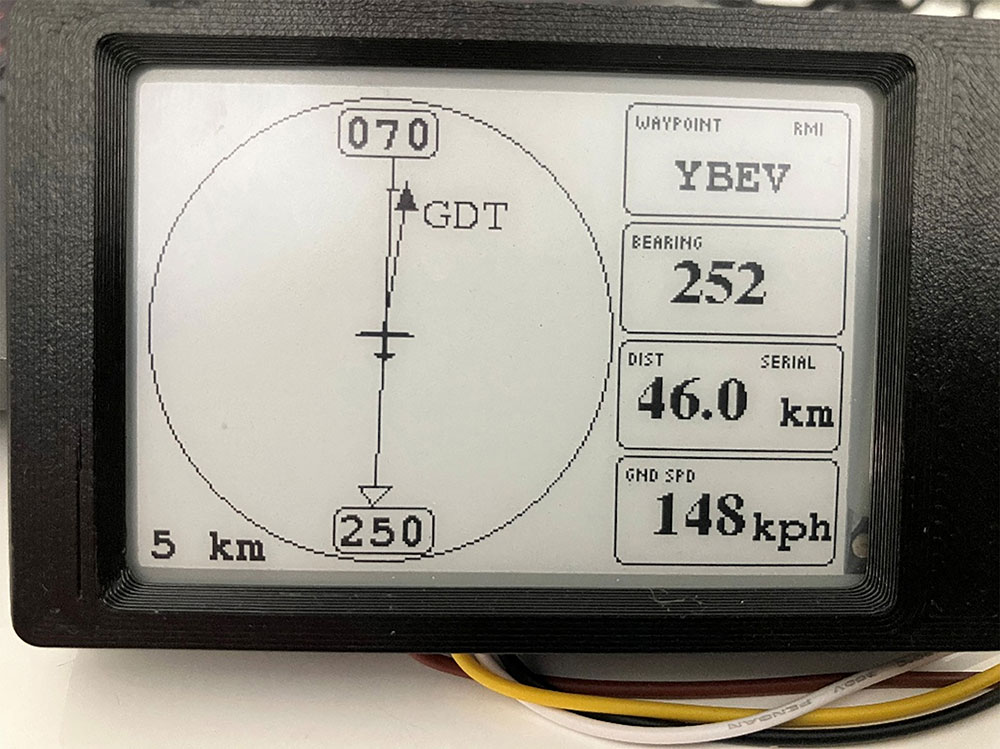
ABOVE: Nav View designed to assist tug pilots navigate for paddock retrieves.
I changed the content of the four text boxes to make them more relevant. The Radar_View mode uses the text boxes to show the distance and relative bearing to the nearest (or alarming) traffic and the Competition ID. As a tug pilot, I unintentionally found this is very useful as I can easily see the rego of the glider on tow (the closest traffic) which greatly helps with radio communications. Also, when under tow, the distance will show as approx imately 75m, the rope length. When the glider releases and its distance increases, I can see the direction it is heading and monitor its position, so confirming safe continuing separation.
Coincidentally when I was working on the SkyView, I was considering what handheld GPS device to purchase for my club’s tugs for aero retrieve navigation, as the old ones were on their last legs. I wondered, since the FLARM GPS is feeding location data to the SkyView, could it be used?
To find out, I added a Nav_View screen and code so that the text boxes would show the bearing and distance from a selected waypoint (eg the home airfield), which is the data format used by a downed glider pilot to report his position. I had the opportunity to fly the tug on a retrieve using this and it worked exactly as intended. But I still wished it had a needle (like an RMI) that always points to the waypoint. So, in version WAGA03, it’s there!
The WAGA SkyView has a built-in buzzer suitable for glider use. Alternatively, it can give synthetic voice alerts to a speaker - for example, ‘Warning: Traffic 2 o’clock, 12 hundred feet, above’. (Note: The display creates the voice, not the FLARM transceiver.) We’ve also learned to connect the SkyView via a tug’s radio or audio panel to the pilot headset. Some pilots liked the voice prompts, other didn’t, so now it also has the option to send tone alerts to the headset.
A short video on YouTube entitled ‘Flarm Display - SkyView WAGA Ver 03’ [https://youtu.be/_5mlzl7RmtM] shows the Waga SkyView Display in action using simulation data.
Several other developers, mostly paraglider pilots, are currently working on their own forks (versions) of the SoftRF SkyView. Thus, other development boards and screen options are starting to appear, but they will not have the unique WAGA SkyView features unless someone ports them across.
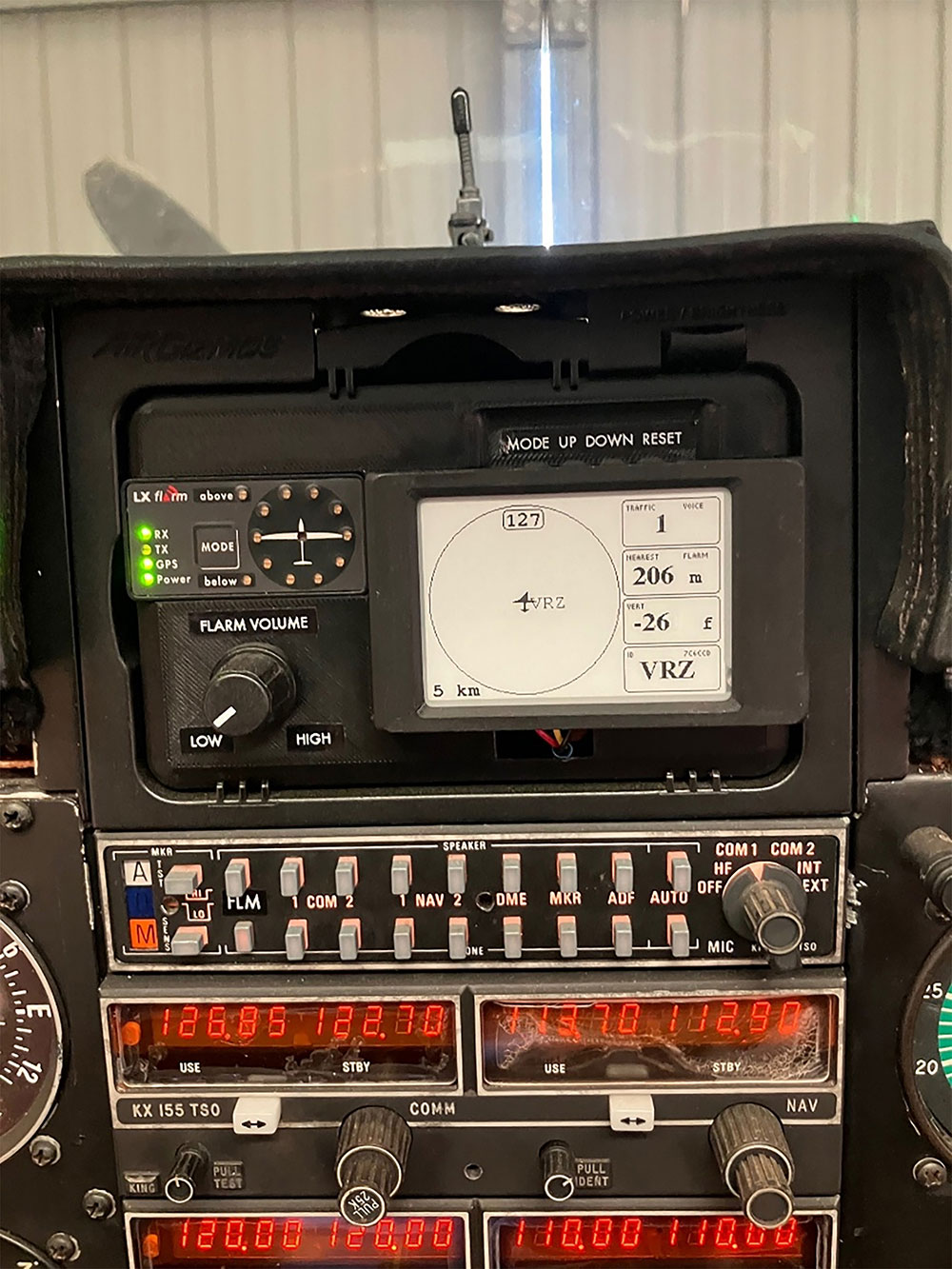
Above: WAGA SkyView installed in a Maul tug with voice alerts to pilot headset via the comms panel.
Conclusion
The WAGA SkyView Display is the $60 FLARM & ADSB ‘radar’ display included in the WAGA Flarm system bundle that helped achieve the target price of under $1,000. More than 30 are in use in WA.
It can be used with any genuine FLARM such as MouseFlarm, PowerFlarm, WAGA Flarm or a SoftRF device. For just $60, it has a lot of functionality and may be a useful accompaniment or alternative to a standard FLARM LED display for owners on a limited budget. It does not attempt to compete with the expensive commercial FLARM radar displays.
It is the first and currently only FLARM display to have features designed for tugs. Tug pilots have commented they find it improves safety because of their increased situational awareness, visibility of release separation and their ability to see the callsign of the glider on tow and voice collision warnings to the pilot headset. It’s also an effective basic navigation tool for paddock retrieves and returning to base.
The WAGA SkyView Display is a DIY build. The development board with integrated screen arrives fully assembled from the supplier. The builder has to download the software from an internet repository, load it onto the board by following a short set of ‘flashing’ instructions and then configure simple settings using a smart phone.
The source code, binaries, user manual, flashing instructions and the traffic simulator are in my GitHub repository at Bumpff/SoftRF_Skyview-WAGA if anyone wishes to explore.
I do not sell, manufacture or warrant these devices in any way. I’m happy to provide remote assistance and advice.
SOFTRF
SoftRF is an ‘open source’, non-commercial software solution that operates in the Instrument Scientific and Medical (ISM) radio frequency band and can 2-way communicate with Electronic Conspicuity (EC) devices using many of the common EC protocols. Its protocol options include Legacy (a close imitation of FLARM frequency hopping and encrypted communication protocol), FANET, ADS-B In and OGNTP.
Theoretically, SoftRF transceivers can see and be seen by FLARM transceivers, provided that SoftRF has kept up with any changes made by FLARM to its radio protocol. This is the same issue that the Online Glider Network (OGN), the ground receiver and data system that drives the likes of PureTrack, has since it too is not supported by the FLARM company. In practical use there have been mostly reports of good compatibility but also some issues, which seem to be getting fewer as bugs are resolved.
Note: FLARM cautions that “SoftRF is not based upon FLARM software. Correct functionality or interoperability cannot be guaranteed. Disrupting the FLARM network can negatively impact flight safety. Responsibility rests with the user.” (Source FLARM website 02 March 2025).
An Open Source Approach
Open source software is publicly accessible source code that anyone can inspect, modify and enhance, thus promoting collaboration and transparency in software development. XCSoar is an example of open source software. It is generally licensed for reuse on the basis that no commercial gain is permitted. Releasing a project to the open-source world of software development can bring together worldwide volunteer programming talent. In the case of aviation EC systems, the programmers are often active pilots, who use their flying and programming skills to continue building ever-improving IT solutions for pilots.
SoftRF devices are not marketed by commercial companies or sold as ready-to-use products. Individuals or groups need to acquire the appropriate hardware (multi-purpose ‘development’ boards usually made in China) and load the free software. Such devices can be assembled by an average person following written instructions, but a basic understanding of electronics and computing is useful.
Like FLARM, a SoftRF system comprises of a transceiver and display, or a combined transceiver/display unit. GPS and FLARM data is passed from transceiver to display by cable, internet hotspot or Bluetooth using either the standard NMEA or GDL90 data communication sentence structures.
The SoftRF transceiver hardware comes with a default 6-digit hex ID, just as FLARM transceivers have. It is also possible to program them with the an aircraft’s unique ICAO 6-digit hex ID. This means they are uniquely identifiable and can be registered on the OGN, similar to FLARM devices. An ADSB-In module can be added to a SoftRF transceiver.
The assessment of potential collisions is undertaken by the FLARM transceiver or SoftRF transceiver, not in the FLARM display or SoftRF SkyView display. SoftRF transceivers assess potential collisions either by distance or ‘vector’ and issue collision alarms in an identical format to FLARM. ‘Vector’ is likely an approximation of the FLARM collision prediction algorithm but may not be as good.
The SoftRF project includes the SkyView display, which is capable of displaying data from a genuine FLARM or SoftRF transceiver as a ‘radar’ screen and collision alarms. A SoftRF SkyView display can work with a genuine FLARM transceiver, and a commercial FLARM display will work with a SoftRF transceiver.
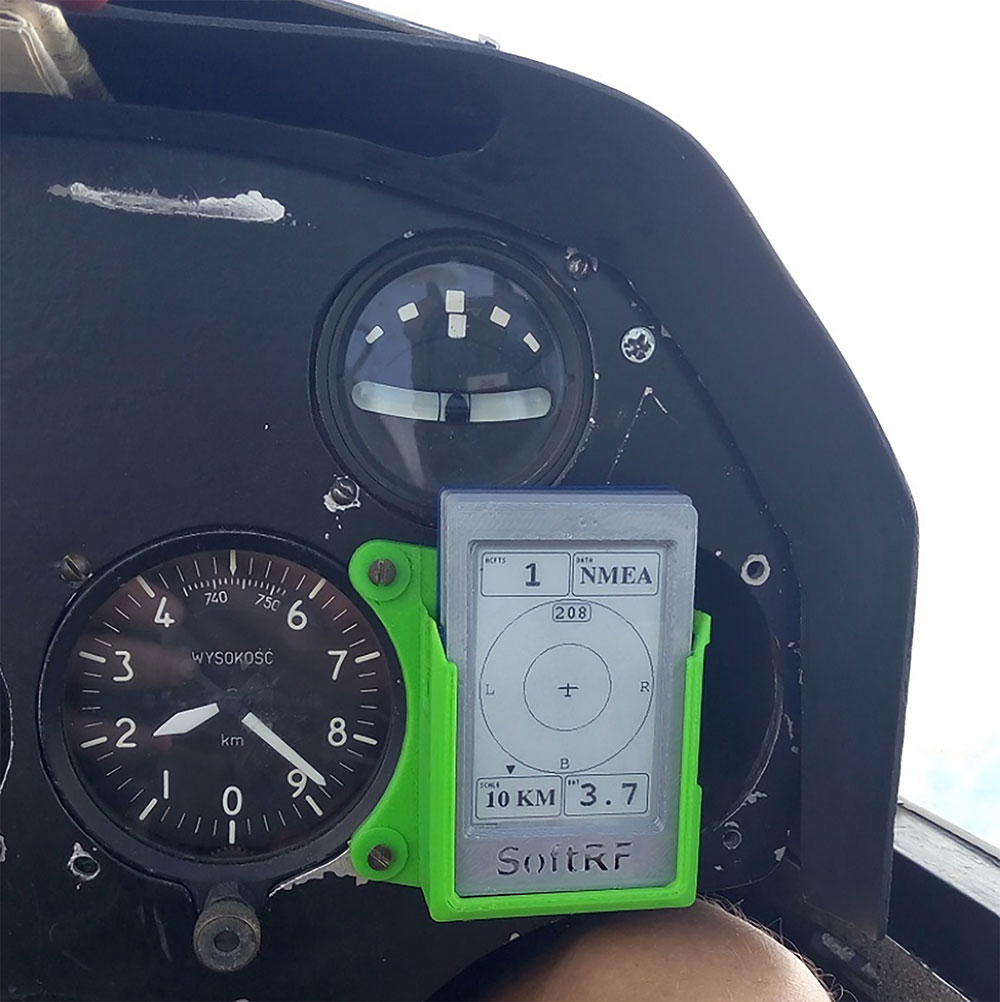
The originator of the SoftRF project was Linar Lyusupov in 2015. He described the project as “a DIY, multi-functional, compatible, sub-1 GHz ISM band radio-based proximity awareness system for general aviation”. He created the software (with credit to numerous contributors of code libraries), selected commercially available low-cost hardware and designed enclosures.
Figure X: Linar original SoftRF Skyview
In 2022, Moshe Braner started a ‘fork’ (independent version) of the SoftRF code based on Linar Version 1.2. He has advanced the code considerably in many ways including the option to set Aircraft ID (eg ICAO hex code) rather than device default code, improved ‘vector’ collision assessment, ADS-B module, support for multiple hardware options and lots more.
Linar has not incorporate these changes in his version but has made a small number of amendments of his own. Thus SoftRF has evolved into two distinct forks with the Braner fork probably the most capable version that is being developed more actively.
Linar and Braner opensource code is publicly accessible on github.com, the online software developers’ repository. Anyone can download the source code, at no cost, for their personal use and amend it if they wish, subject to some license terms. Figure X: Linar original SoftRF Skyview
In 2022, Moshe Braner started a ‘fork’ (independent version) of the SoftRF code based on Linar Version 1.2. He has advanced the code considerably in many ways including the option to set Aircraft ID (eg ICAO hex code) rather than device default code, improved ‘vector’ collision assessment, ADS-B module, support for multiple hardware options and lots more.
Linar has not incorporate these changes in his version but has made a small number of amendments of his own. Thus SoftRF has evolved into two distinct forks. Of these, the Braner fork is probably the most capable version, and being developed more actively.
Linar and Braner open source code is publicly accessible on https://github.com, the online software developers’ repository. Anyone can download the source code, at no cost, for their personal use and amend it if they wish, subject to some license terms.